

Blog
7 Practical Tips to Improve Survey Response Rates
Read full story

“Not another survey!” It is a reaction many people have when, yet another invitation lands in their inbox.
Customers and employees are regularly asked to share their opinions. This can lead to survey fatigue: people become less willing to participate because they receive too many requests, or because previous surveys felt too long or pointless.
The challenge is not simply to send more invitations. It is to give people a good reason to respond, reach them through the right channel and make participation worthwhile.
A low survey response rate can also increase the risk of nonresponse bias. This happens when the people who respond differ from those who do not, meaning your results may no longer reflect your entire target group.
So, how can you encourage more people to take part? Here are seven practical ways to improve your survey response rates.
The survey response rate is the percentage of eligible people you invited who completed your survey. It is calculated using this formula:
Response rate = Completed surveys ÷ Eligible people invited × 100
Example: You invite 200 people and 80 complete your survey. Your response rate is 40%.
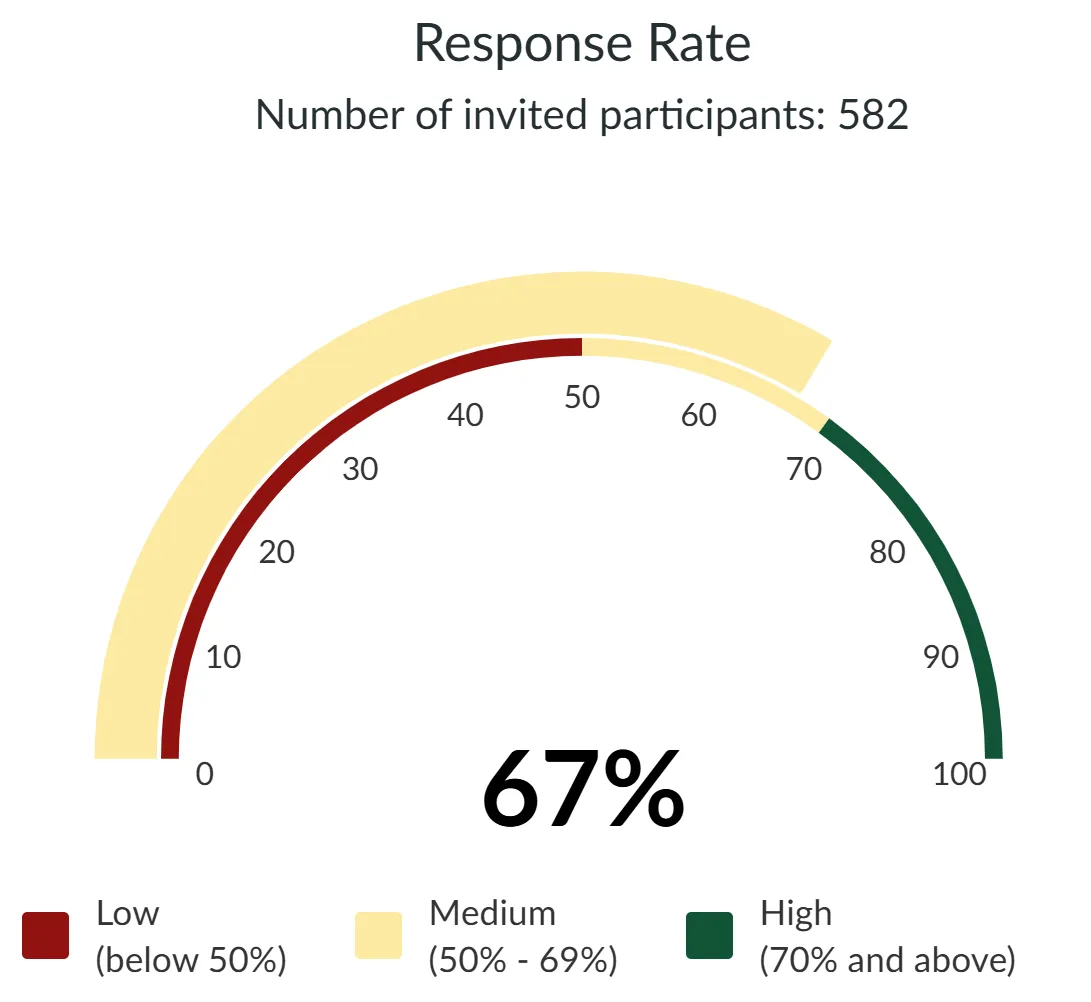
Example: 67% response rate from 582 invited members.
Don't confuse the response rate with the completion rate. The completion rate measures how many people who start your questionnaire also finish it. Both are useful metrics, but neither guarantees that your results are representative.
There is no single response rate that is considered good for every survey. Results depend on factors such as your audience, survey topic, invitation method and relationship with participants. Compare your results with previous surveys that have a similar audience and purpose.
There is no single trick that guarantees a high response rate. The best results come from combining a relevant invitation, the right audience and a questionnaire that respects people's time.
1. Make Your Invitation Stand Out
People decide quickly whether an invitation is worth opening. A generic subject line can easily get lost among other emails. Make it personal, relevant and engaging.
Avoid | Try instead |
New Customer Satisfaction Survey | Your feedback matters, [First Name] |
Please participate in our survey | [First Name], your voice counts! |
Customer feedback request | Help [Company] improve your experience |
You can also use a recognisable sender, such as a CEO or account manager, when appropriate. For example: “[First Name], our CEO would value your opinion.”
Tip: Be creative but keep the message honest. Make sure the invitation clearly communicates what the survey is about and who is asking.
2. Give People a Reason to Participate
Why should someone spend their time answering your questions? Explain what their feedback will contribute and, where possible, show participants what they get in return.
This does not always have to be a financial reward. You could offer:
A summary of the survey results.
A chance to influence a product or service.
A donation to a good cause for every completed survey.
A small reward or prize draw.
For example, tell participants that every completed survey helps plant a tree. Make sure the promised benefit is clear and that you can deliver on it.
Tip: Focus on a concrete benefit rather than simply asking people to help you.
3. Choose the Right Invitation Channel and Moment
Email is a common way to distribute surveys, but it is not always the best option. Think about where your audience is most likely to see and respond to your invitation.
Consider:
Email: A recognisable sender and an engaging subject line can help your invitation get noticed.
SMS or WhatsApp: Useful when a short, direct invitation suits your audience.
Website and in-the-moment feedback: Invite visitors at a relevant moment in their journey, such as after a purchase, when they visit a specific webpage or after a customer support interaction. With the InMoment Extension, you can trigger surveys on your website or app based on user behaviour.
Client app: Reach users in an environment they already use.
A combination of channels can also help you reach different groups. Survalyzer supports several survey distribution options, including email and SMS invitations.
Understanding the different stages of the customer journey can also help you identify the right moments to ask for feedback.
Tip: Ask for feedback when the experience is still fresh. For example, shortly after a customer has received an order or contacted your support team.
4. Reach the Right Audience
More invitations do not automatically mean better results. Invite people who can provide relevant feedback and keep your contact list accurate.
A clearly defined target group helps you collect useful responses and makes your results easier to interpret.
Tip: Remove duplicate and outdated contacts before sending invitations. Use information you already have in your CRM or employee database instead of asking participants to provide it again.
5. Keep Your Questionnaire Short and Relevant
Long questionnaires can increase survey fatigue. Ask only what you need, use clear wording and avoid repeating questions or requesting information you already know.
The right length depends on the audience and purpose. An employee experience survey may need more questions than a short customer satisfaction survey, but every question should have a clear reason to be there.
Choosing the right question types also helps you keep your questionnaire focused. Read our guide to the best survey question types for more practical advice.
Use randomisation and skip logic where appropriate so participants only see questions that are relevant to them.
Tip: Test the completion time yourself and remove unnecessary questions before sending your survey.
6. Send Reminders at the Right Time
People may intend to complete a survey but forget. A reminder gives them another opportunity to respond.
Research reviews support the use of reminders in survey invitations. The right timing depends on your audience and survey deadline. For example, you could test sending a first reminder a few days after the initial invitation and a second one closer to the deadline.
Tip: Send reminders only to people who have not yet responded. Space them appropriately and keep the message short.
7. Test Your Invitations and Use Incentives Carefully
Small changes to your invitation can influence whether people open and complete a survey. Use A/B testing to compare different subject lines, messages or calls to action.
Incentives can also encourage participation. Research suggests that monetary incentives, particularly when offered upfront, can be more effective than prize draws in some survey settings. However, the effect varies by audience and method, and rewards may influence the type or quality of responses.
Want to learn more? Read our article on A/B testing in surveys.
Tip: Test different invitation texts with comparable groups. If you offer an incentive, measure whether the additional responses justify the cost.
Survalyzer gives you the tools to put these tips into practice:
Survey Builder and Skip Logic: Keep questionnaires short and relevant for each respondent.
Nova, our AI Survey Assistant: Create and edit surveys through a simple chat and save setup time. Available on Expert and Enterprise.
Distribution: Send email and SMS invitations and schedule reminders with Automated Scheduled Invitations. Explore our survey distribution options.
Personalisation: Use Custom Variables and placeholders to address participants directly.
Mobile-friendly Surveys and Progress Bar: Make completing your survey easier on different devices.
InMoment Extension: Use trigger-based surveys to collect feedback at relevant customer touchpoints.
Community Extension: Reward panel members with points and vouchers through Incentives Management.
A/B Testing and Survey Analytics: Compare invitations and monitor survey performance. A/B Testing is available on Expert and Enterprise.
Some features depend on your plan. Explore Survalyzer's pricing and plans.
Improving survey response rates starts with understanding your audience. In a world of survey fatigue, a generic invitation is easily ignored. Give people a reason to participate, choose the right channel and moment, keep your questionnaire relevant and make their feedback count.
Test different approaches, monitor where participants drop out and keep improving your surveys.
Not sure where to start? Talk to an expert or try Survalyzer for free.
Cook, C., Heath, F. and Thompson, R. (2000). A meta-analysis of response rates in web or internet based surveys. Educational and Psychological Measurement.
Edwards, P. et al. (2009). Methods to increase response to postal and electronic questionnaires. Cochrane Database of Systematic Reviews.
Fan, W. and Yan, Z. (2010). Factors affecting response rates of the web survey: A systematic review. Computers in Human Behavior.

